How to Sell Chickens and Eggs to Vang in Rooster Rivals
Use Vang’s Sell Box to sell surplus chicks, hens, roosters and incubator eggs for coins. Check the selected entries and payment allowance before confirming a sale.
Talk to Vang and choose SELL, then open BIRDS or INCUBATOR. Check the green checkmarks, selected count, total price and Full price today allowance before confirming. Unlock favorite birds first; brooding hens are kept during a sale. Vang pays full price for the first 50,000 coins of daily sales, then 35%. Sold birds cannot be recovered.
Sell Box and sale consequences
Talk to Vang and choose SELL to open the Sell Box.
- BIRDS lists farm birds from chicks through adults.
- INCUBATOR lets you select eggs in your incubator.
If you open the Sell Box while carrying a bird, that bird is already ticked. Untick it if you intend to keep it.
A completed sale removes the sold birds or eggs from your holdings and pays coins. Sold birds cannot be recovered, so check the selection before committing.
Select and inspect a sale batch
| Control or indicator | Purpose |
|---|---|
| ALL | All bird types |
| CHICKS | Chicks |
| HENS | Adult hens |
| ROOSTERS | Adult roosters |
| Cheapest / priciest | Price sorting |
| SELECT ALL | Select entries |
| CLEAR | Clear selection |
| Yellow border | Currently inspected entry |
| Green checkmark | Selected for sale |
Click an eligible bird or egg to inspect and tick it; click it again to untick it. The detail panel also provides TICK TO SELL and TICKED - TAP TO UNTICK controls. Bird details include the level or growth stage, HP, Attack, Defense, Speed, gene grades and Vang’s price breakdown.
Inspection and sale selection are separate states. A yellow border identifies the entry whose details you are reading. Green checkmarks identify the entries included in the sale. Opening a locked bird’s details does not clear another bird’s existing checkmark.
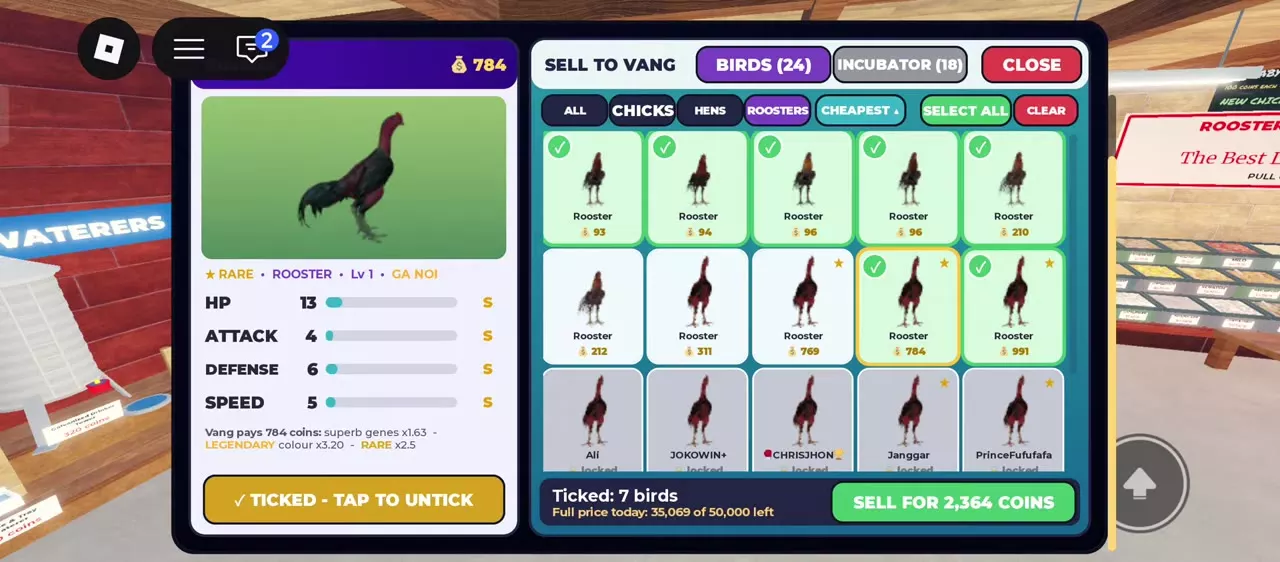
Before selling, check the bottom of the Sell Box for the ticked count, combined sale price and Full price today amount. With no entries selected, it displays NOTHING TICKED. Use CLEAR when you want to rebuild a batch from an empty selection.
Daily full-price allowance
Vang pays full price for the first 50,000 coins of sales each day. Once that allowance is exhausted, selling continues at 35% of the price. The allowance measures coins of sales, rather than a number of birds.
Read Full price today at the bottom of the Sell Box before confirming a large batch. Compare the batch total with the remaining amount when choosing how many birds to sell at full price.
How full-price sales reduce the allowance
| Batch | Birds sold | Coins paid | Allowance before | Allowance after |
|---|---|---|---|---|
| Hens | 8 | 1,315 coins | 36,384 coins | 35,069 coins |
| Roosters | 10 | 3,656 coins | 35,069 coins | 31,413 coins |
Both batches fit within the remaining allowance. Together, they sold 18 birds for 4,971 coins and reduced the allowance by the same amount.
Payment after the allowance is exhausted
When no full-price allowance remains, the percentage calculation for a full-price quote of P coins is 0.35 × P, before game rounding. That calculation applies to sales made after the allowance is already exhausted.
Confirm single or bulk sales
Sell a checked batch
- Review the green checkmarks, selected count and total price.
- Click SELL FOR … COINS.
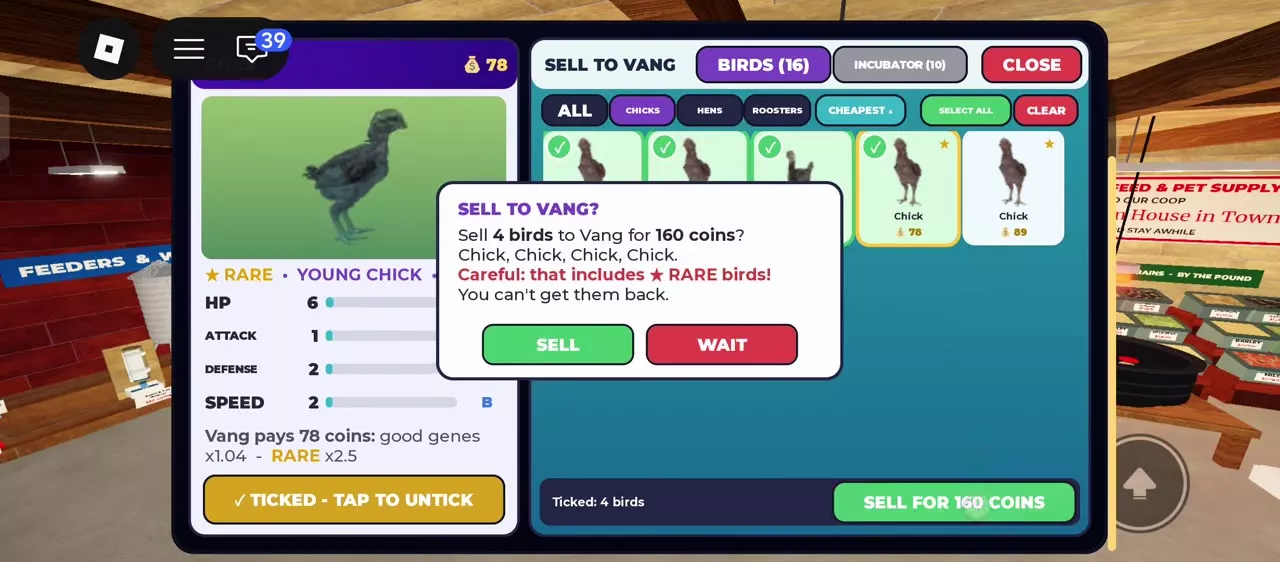
- Read the confirmation window’s bird list, quantity and total. A batch containing a Rare bird carries an additional warning.
- Choose SELL to proceed, or WAIT to return to the Sell Box.
- Read the payment message for the number of birds actually sold and the coins received.
For example, a batch of four chicks quoted at 21, 29, 32 and 78 coins sold for 160 coins. The confirmation listed all four chicks and warned that the batch included a Rare bird. Those prices belong to those individual chicks.
Sell one carried bird
Use the carried bird’s SELL - [price] button. It changes to TAP AGAIN TO SELL; tap again to complete the sale. Vang takes the sold bird from your hands.
The payment message is the final check on the completed transaction. Its count reflects the birds actually sold, including any reduction caused by a retained brooding hen.
Locked, caged and brooding birds
Unlock a favorite bird
Favorite locks prevent selling. To remove one:
- Pick up the bird and open INSPECT.
- Click the filled star beside its name so it becomes an outline.
- Read the unlock notification confirming that the bird can be sold and traded again.
Unlock birds you intend to sell and keep the lock on birds you want to protect. See chicken controls and favorite management for the other flock controls.
Sell a caged bird
Vang automatically takes a selected bird out of its cage when selling it. You do not need to remove it from the cage first.
Understand a retained brooding hen
A brooding hen is kept during the sale, even when included in the selected batch. This changes the actual number sold and the payment.
For example, selecting a 36-coin brooding hen and a 36-coin rooster produced a 72-coin selection total. The completed sale paid 36 coins for one bird, and the message stated that the brooding hen was kept. The hen remained on the farm.
Quotes and breeding income
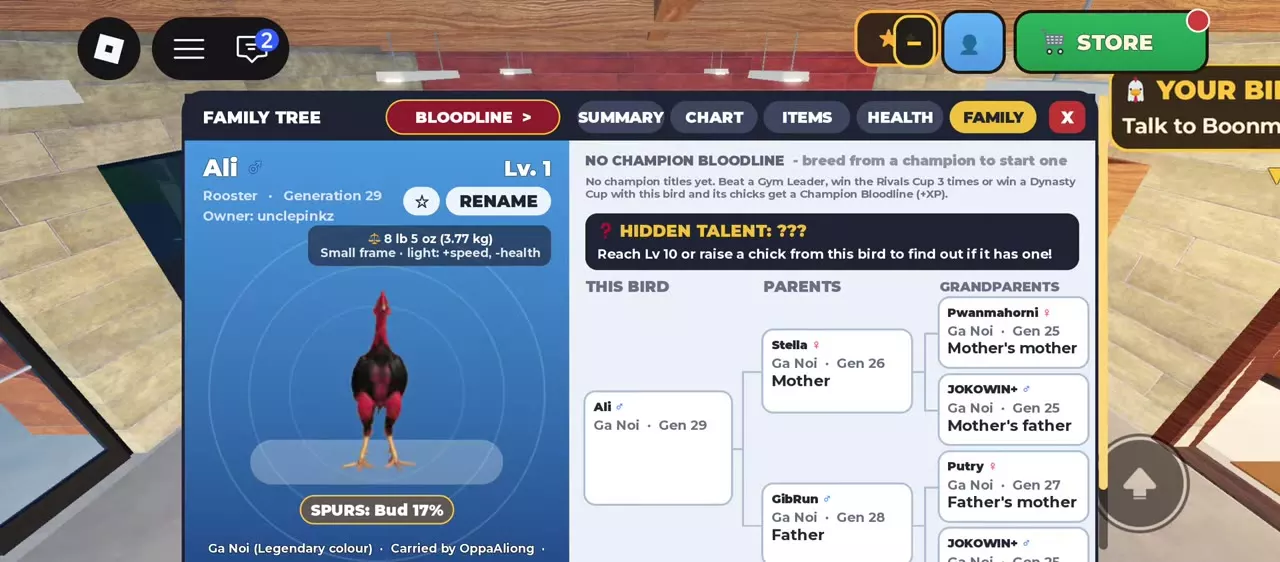
Vang’s quote depends on the individual bird’s attributes, including genes, age, color rarity, Rare status, bloodline, titles and level. Talent bonuses also contribute to individual quotes. Egg prices depend on the parents’ grades. Use bird values and Vang’s price factors to understand a price breakdown and compare individual quotes.
Protect useful breeding birds before selecting surplus offspring for sale. The coin-earning and surplus-breeding guide explains what to retain and how to combine sales with other income.
Vang’s NPC quote is separate from a player’s offer or market-stall price. Use the player trading and market-stall guide when arranging a sale to another player.