Rooster Rivals Clans and Clan Derby
Use the Clan menu to find a group, invite players, manage members and coordinate across servers. Clan Derby adds weekly clan-versus-clan competition with separate Rooster and Hen divisions.
Open FIND CLANS to search by clan tag or name, then use VIEW to inspect a clan and its ASK TO JOIN option. Send invitations through MEMBERS → INVITE PLAYERS. Clan Derby registration runs Monday–Wednesday, the fight card is set Thursday, and fights run Friday–Sunday. Leaders and Co-Leaders arrange the lineup manually or with AUTO; each bird fights once per derby.
Clan menus, levels and capacity
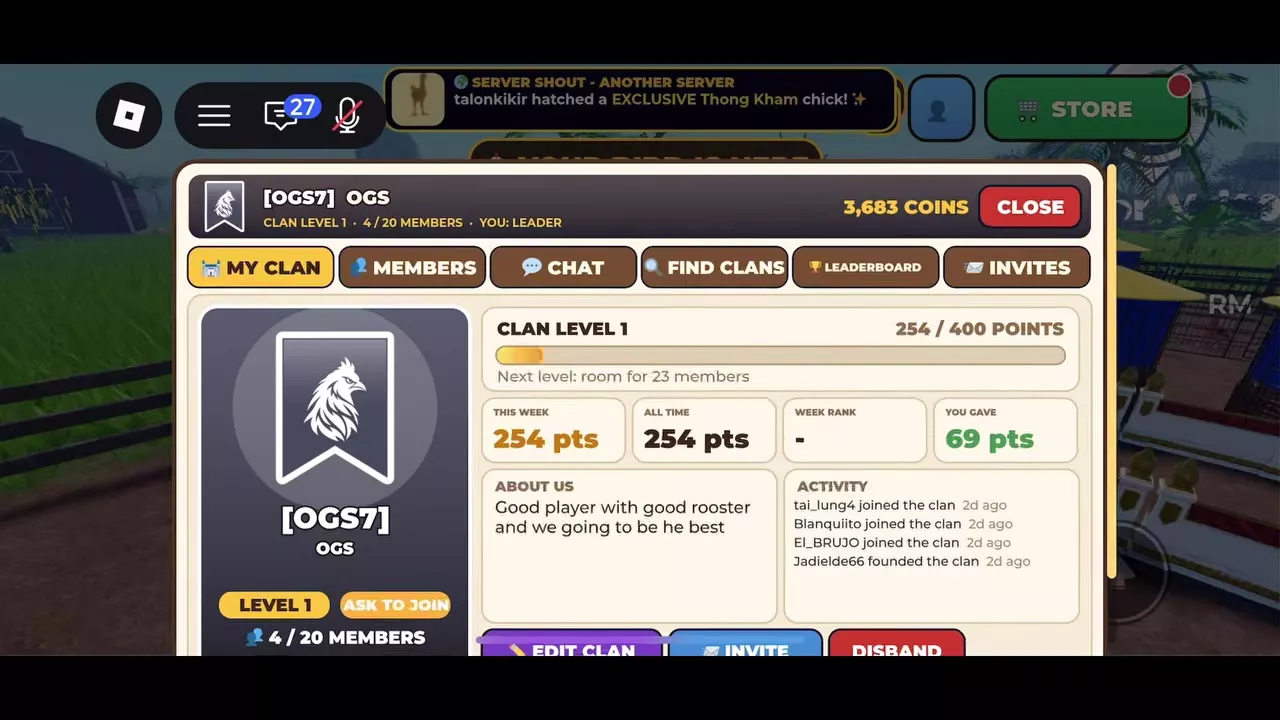
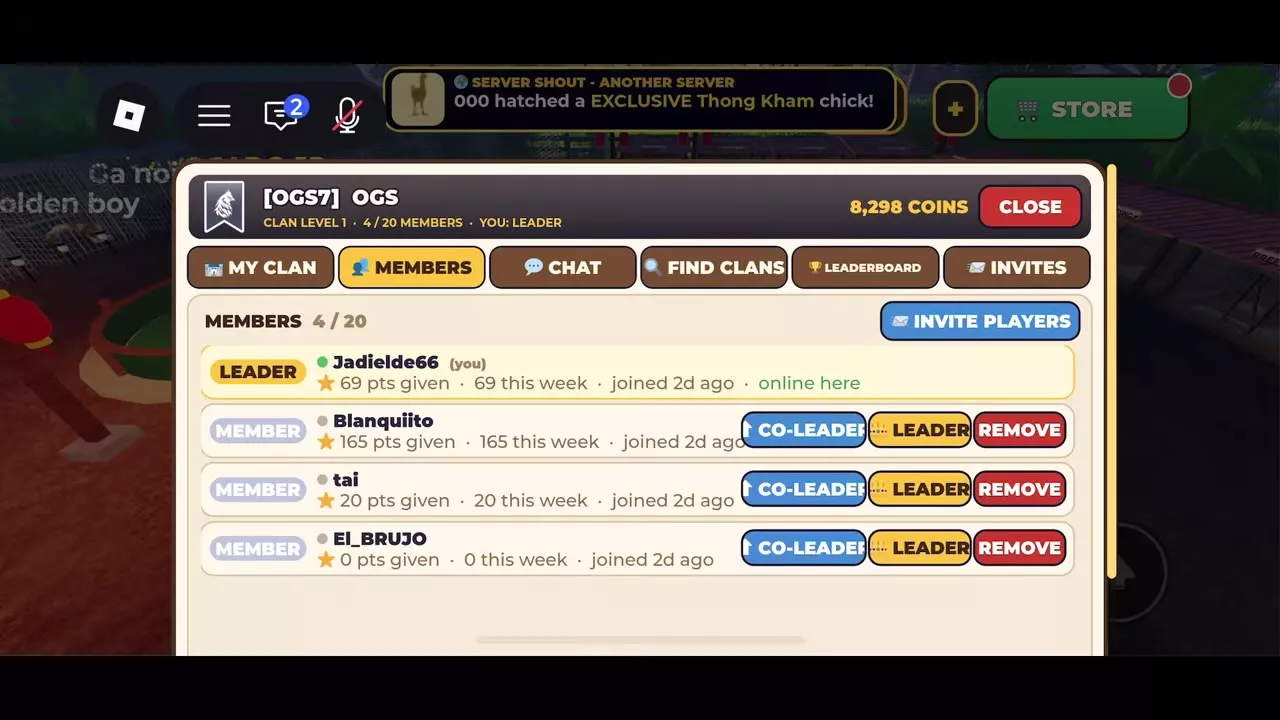
The Clan menu has six tabs: MY CLAN, MEMBERS, CHAT, FIND CLANS, LEADERBOARD and INVITES. Open MY CLAN to check your clan's level, current membership, level-progress bar and next-level capacity.
Read weekly points separately from level-progress points. FIND CLANS displays weekly points beside each clan, while the progress bar in MY CLAN shows progress toward the next level. MEMBERS breaks out individual contributions and weekly points.
At Level 1, the progress target is 400 points. For example, a bar showing 254/400 needs another 146 points to reach that displayed target. Level 2 increases capacity from 20 to 23 members.
Clan
| Level / Stage | Member capacity | Level-progress target |
|---|---|---|
| Level 1 | 20 members
| 400 points The Level 1 progress bar has a 400-point target toward the next level.
|
| Level 2 | 23 members
| — |
| Level 7 | 38 members
| — |
| Level 8 | 41 members
| — |
| Level 9 | 44 members
| — |
Clan Derby registration and fight days
Clan Derby is a weekly clan-versus-clan competition with separate Rooster and Hen divisions. Participate as part of a clan and follow this weekly cycle:
| Days | Derby stage |
|---|---|
| Monday–Wednesday | Registration |
| Thursday | Fight card set |
| Friday–Sunday | Fights |
Register during Monday–Wednesday, review the fight card on Thursday, and follow your scheduled matches during Friday–Sunday.
Find clans and invite players
Find a clan
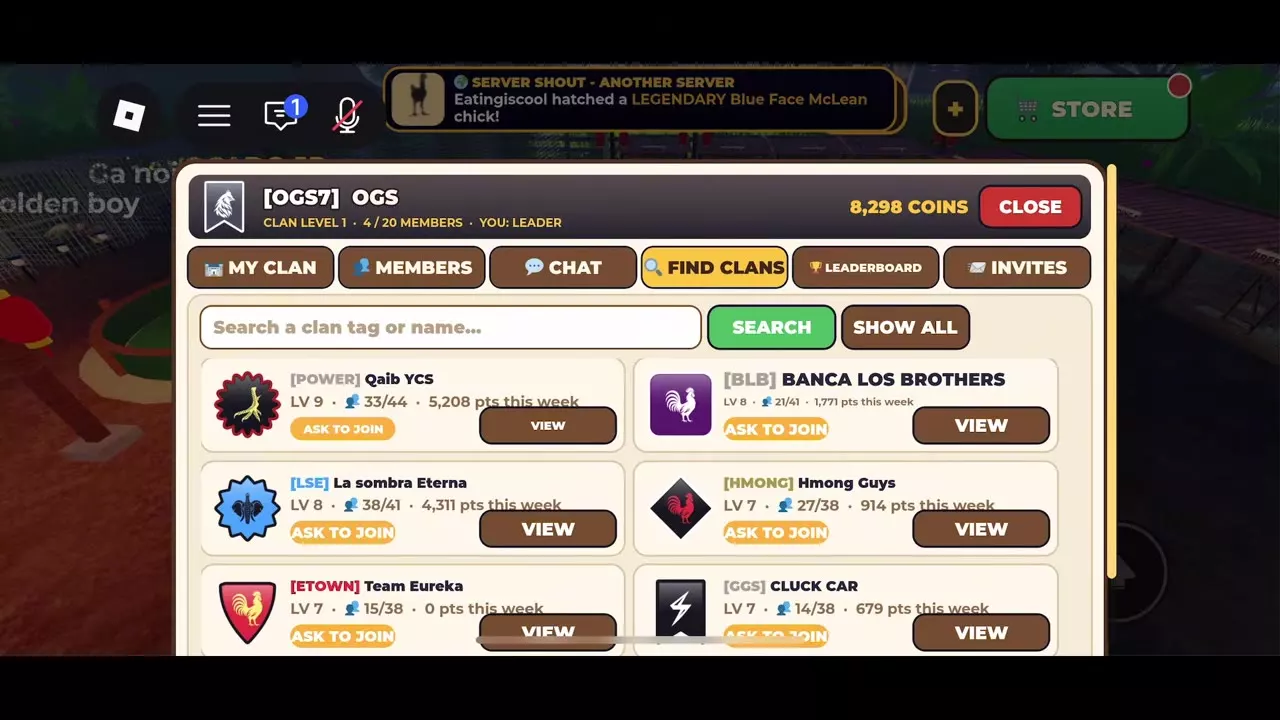
- Open the Clan menu and select FIND CLANS.
- Enter a clan tag or name and select SEARCH, or select SHOW ALL to browse.
- Compare the clan's level, member count and weekly points.
- Select VIEW to inspect its details and look for ASK TO JOIN.
Compare the current member count with capacity when choosing a clan. Weekly points give you a separate activity figure to consider alongside available room.
Invite players
With access to INVITE PLAYERS in your clan's MEMBERS tab:
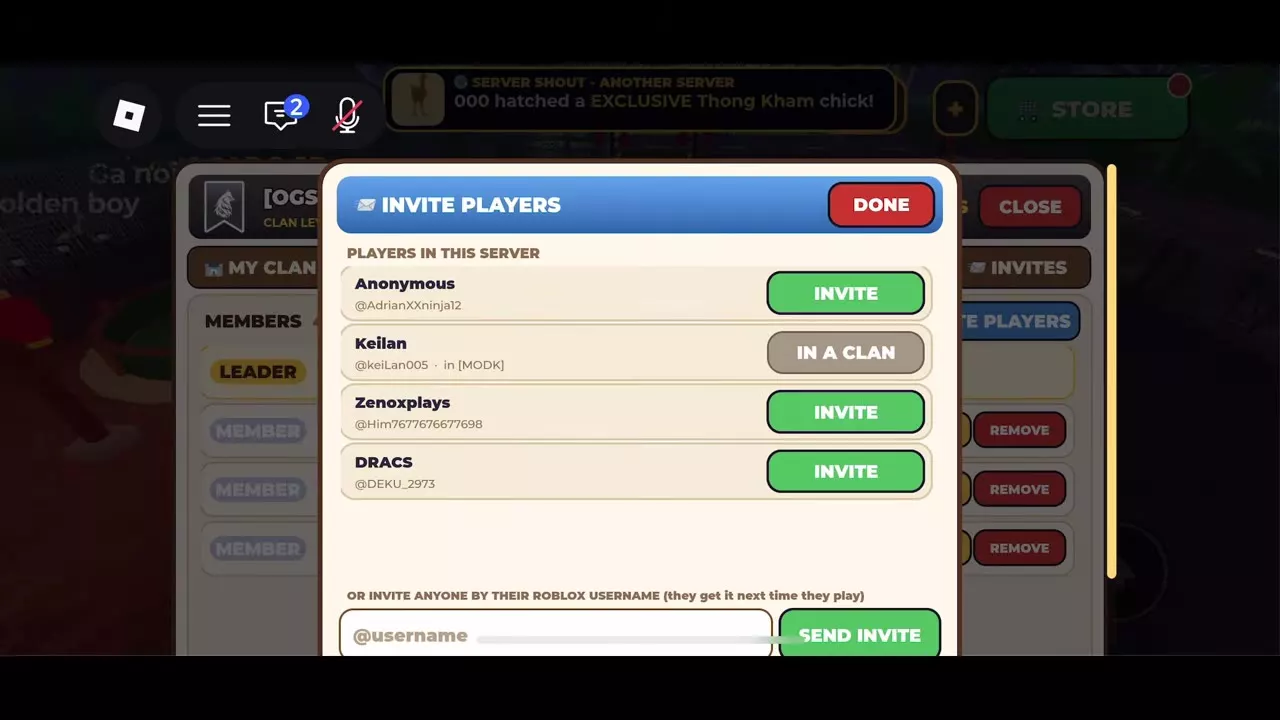
- Open MEMBERS → INVITE PLAYERS.
- Under PLAYERS IN THIS SERVER, select INVITE beside the player you want to invite. Alternatively, enter their Roblox username and select SEND INVITE.
- Select DONE to close the panel.
Username invitations reach the recipient the next time they play. A server-list player who already belongs to a clan displays IN A CLAN and their clan tag instead of an INVITE button.
Manage members and clan chat
Member information and Leader controls
Open MEMBERS to review each member's role, contributed points, weekly points and join time. Use contributions and weekly points to compare participation, with join time providing context for newer members.
As the clan Leader, use the controls on another member's row for the intended change:
- CO-LEADER — promote the member to Co-Leader.
- LEADER — transfer the Leader role to that member.
- REMOVE — remove the member from the clan.
Cross-server chat
Select CHAT to read your clan's messages. Only members of the same clan can see Clan Chat, and it works across servers. Messages remain available for three days, so use it to coordinate without requiring everyone to join the same server.
Lineups and scouting
The clan's Leader and Co-Leaders choose which bird fights in each position. Assign birds manually to control those choices, or select AUTO to fill the lineup. Each bird fights once per derby, so plan positions across the available birds rather than relying on one bird for multiple fights.
The opposing clan's fighting styles remain hidden until you scout them. Scout before making matchup-based lineup decisions.
Use the revealed styles to account for specific disadvantages. Head Hunter has an unfavorable matchup against UnderWing because UnderWing ducks head attacks. When choosing positions manually, account for that disadvantage instead of judging the pairing by level alone.
Live fights, history and rewards
Watch live or replay a derby
Watch scheduled Clan Derby arena fights live during the Friday–Sunday fight period. To revisit an earlier event, open HISTORY, select a past derby, and inspect its participating birds, fight card and replays.
Use replays to review how a pairing played out before making future lineup choices.
Weekly and monthly rewards
- Weekly: a purse and a winners' flag on the farm.
- Monthly top three: titles, flags, trophies and clan-only color eggs.
Season 1 runs in November 2026, with rewards distributed on December 2, 2026.
Styles and reward collections
- Compare combat roles and known counters in Fighting Styles, Moves and Matchups when planning your lineup.
- Browse Titles, Crowns and Trophies for display rewards and their acquisition conditions.
- Team Derby is a player-hosted event for 2–4 teams. Its host supplies prizes and presses START to begin; weekly Clan Derby follows the registration and fight schedule above. Use Host and Join Player Events to organize a Team Derby.
- Compare other competitive activities in Battle Modes and Arena Challenges.