
How to Hatch Eggs in Rooster Rivals
Collect eggs from a Nest Box, start incubation in the Egg Box, then take out the hatched chicks. Each stage has its own controls, and farm space determines how many chicks you can release.
Use COLLECT at a Nest Box, open the Egg Box, then select an egg and press HATCH—or press HATCH ALL and confirm SURE?. Started eggs keep warming offline. Once chicks are HATCHED, use TAKE OUT or ALL OUT. Chicks that do not fit on your farm stay safely in the incubator until you free space.
Nest Boxes and the Egg Box
Hens lay and brood over eggs in Nest Boxes. Collecting eggs transfers them to the Egg Box, where you choose which eggs to incubate.
Collection does not start incubation. Eggs left unstarted in the Egg Box remain unhatched. Finishing incubation is another separate stage: hatched chicks wait inside until you take them out.
Eggs and waiting chicks share the box's slots. A chick still occupies a slot after hatching; taking it out frees that slot.
Offline incubation and notifications
Eggs keep warming while you are offline once you start incubation. Chicks also continue growing offline. Start HATCH or finish the HATCH ALL confirmation before leaving, and check that the warming status and countdown are active.
For a timing example, a Tabletop Incubator configuration started at 6:00, with a batch message giving approximately six minutes. Use your active countdown to plan your return. Faster Incubator makes eggs warming in your incubator hatch twice as fast.
Turn hatch notifications on
When GET A PING? opens, select TURN ON to enable Roblox notifications for egg hatches and chicks growing up, or select NOT NOW to decline. A gold CHICKS HATCHED! sign or hatch message directs you back to the incubator.
Rare Hatch Shouts in Settings controls server-wide pop-ups for another player's Epic or Legendary hatch. Turn it off to silence those announcements.
Collect eggs and handle brooding hens
- Approach a Nest Box with eggs and use COLLECT.
- Read the collection message. Eggs containing chicks enter the Egg Box; clear eggs contain no chick and go to compost.
- Open the Egg Box to inspect the eggs you collected.
The nest's egg count can exceed the number added to your box because clear eggs are removed during collection. When the collection message attributes clear eggs to closely related parents, introduce unrelated breeding birds. A Shiny Egg hatches into a chick marked RARE.
With Auto-Collect Eggs enabled, a hen's completed clutch goes directly into the Egg Box. The pass covers every breeding coop you own and can be switched on or off.
Check a brooding hen
Pick up a hen sitting on eggs to check underneath her. If the Nest Box says your farm is full, either make room for the chicks to hatch or collect the eggs into the Egg Box. A Shiny Egg remains safe in this full-farm brooding state. For a natural hatch notification, press INSPECT while its notification timer is active.
Collect eggs left behind before they go cold
After moving a hen into breeding, collect any eggs she leaves in her Nest Box within the displayed 10-minute window. That warning applies to eggs left behind by the moved hen.
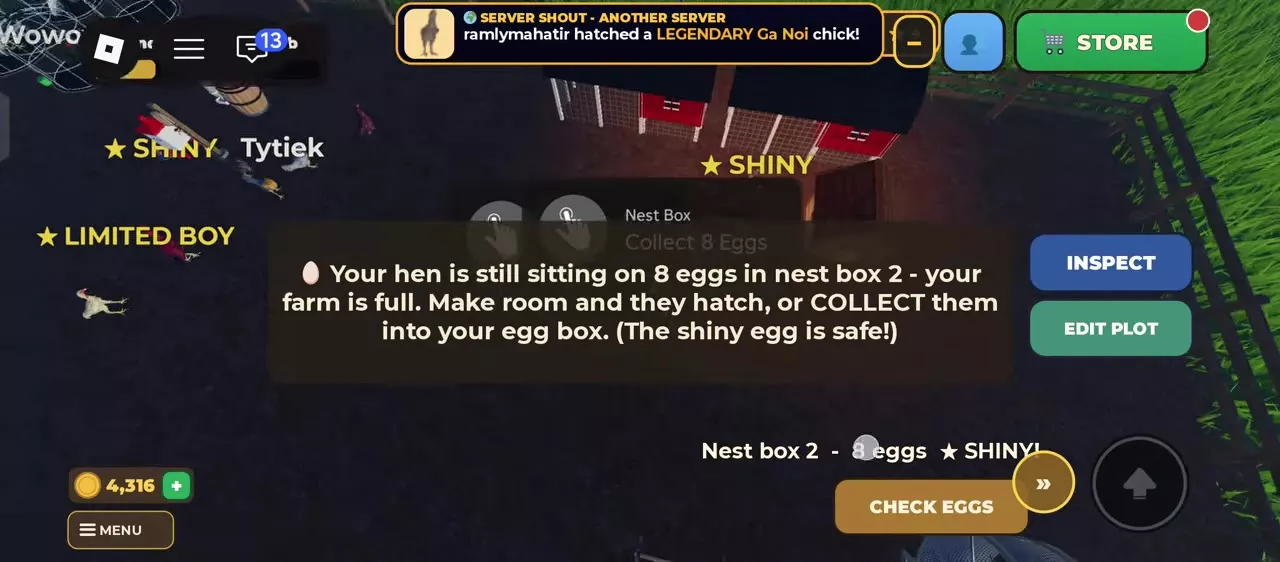
Start one egg or a batch
- Approach the Egg Box and use Open.
- To start one egg, select it and press HATCH.
- To start a batch, press HATCH ALL, then press SURE? to confirm.
- Look for HATCHING or WARMING IN THE INCUBATOR and the selected egg's countdown.
If the batch button still reads SURE?, it is waiting for your second press. Stored eggs that you have not started remain unhatched.
Read the two batch counts
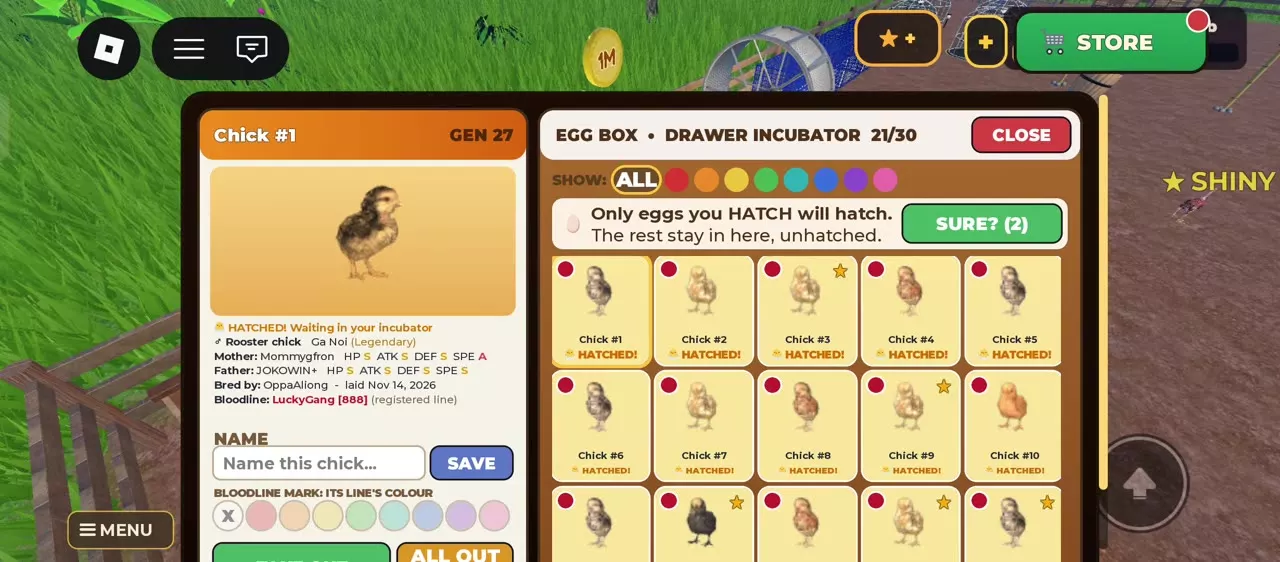
With 19 hatched chicks and two unstarted eggs in a 30-slot Drawer Incubator, the interface reads:
| Display | Value | Meaning |
|---|---|---|
| Box occupancy | 21/30 | Eggs plus waiting chicks |
| HATCH ALL | 2 | Unstarted eggs |
| ALL OUT | 19 | Hatched chicks |
HATCH ALL starts the eggs; ALL OUT releases chicks that have already hatched. The two counts describe different stages of the same box.
A warming egg has a separate STOP WARMING control. THROW AWAY is the egg-discard control. To move a hatched chick onto the farm, use TAKE OUT or ALL OUT.
Names, color marks and parent details
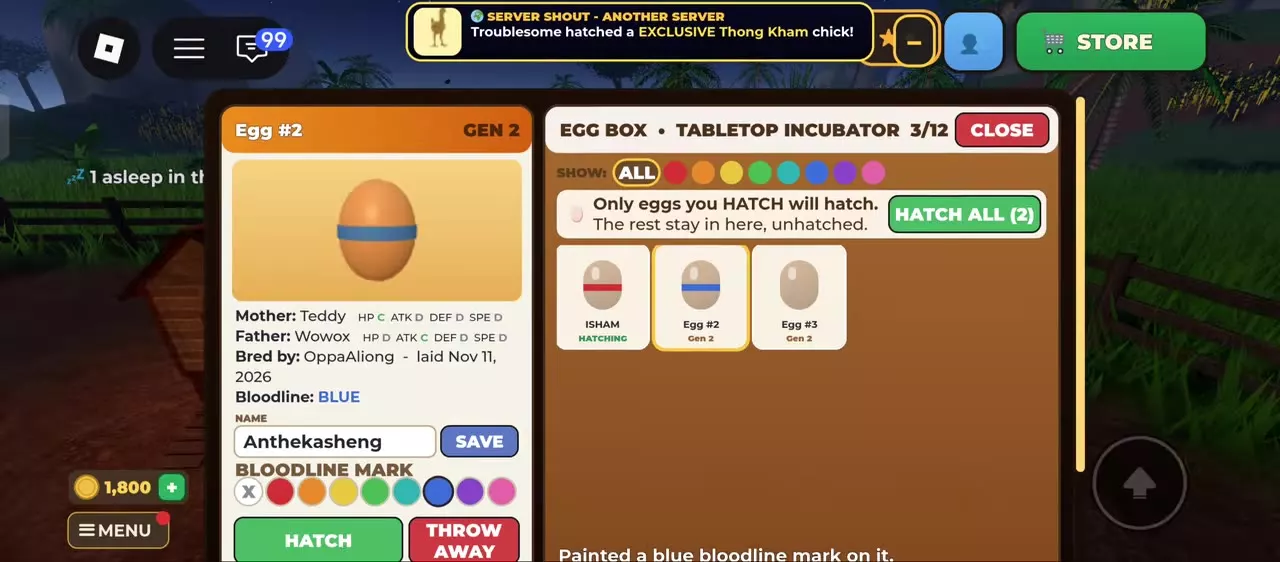
You can name and mark eggs while they are stored or warming, and chicks while they wait to be taken out.
- Select the egg or chick in the Egg Box.
- Enter its name in NAME, then press SAVE. Its detail heading and list card update to the saved name.
- Choose a color under BLOODLINE MARK to add a visible color label. Use X to clear the mark.
- Use SHOW to select ALL or filter by a mark color.
The color row includes red, orange, yellow, green, cyan, blue, purple and pink. Use marks to separate groups you want to find again, such as eggs from different breeding pairs.
Inspect parents and chick identity
The details panel lists generation, both parents and their HP, ATK, DEF and SPE grades, breeder, laying date and bloodline information. After hatching, it also identifies the chick's sex, color or breed name, rarity and hatch status.
An ordinary color mark is a sorting label; applying one does not create or change a registered bloodline. A chick belonging to a registered line displays that family separately, with ITS LINE'S COLOUR on its mark control. See registered bloodlines and champion inheritance for family registration and champion status.
Take out chicks and free space
- Open the incubator when you receive a hatch message or see CHICKS HATCHED!.
- Select a chick marked HATCHED and press TAKE OUT to place that chick on your farm.
- Repeat for individual chicks, or use ALL OUT to release a batch into available farm spaces.
Taking chicks out frees Egg Box slots. On the farm, chicks continue growing and stay together as a group while young.
If only part of the batch comes out
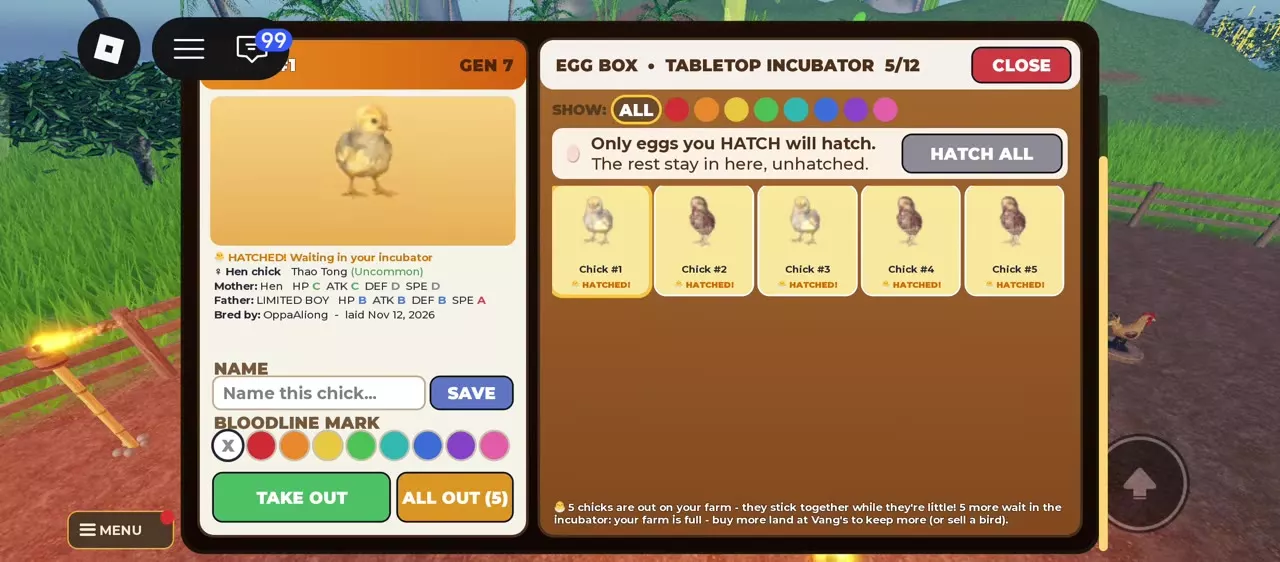
ALL OUT releases the number your farm can hold. For example, with 10 hatched chicks and five available farm spaces, five move outside and five remain safely in the incubator. In a 12-slot Tabletop configuration, the remaining contents read 5/12 and ALL OUT (5).
Increase the limiting land or coop capacity, or sell a bird to free a place, then return for the waiting chicks. More land is available at Vang's. A larger Egg Box adds storage; it does not add places for birds on the farm.
Egg types and farm capacity
- Egg types, breeding coops and incubators lists egg sources and facility options. Choose storage for a crowded Egg Box and incubation speed for a long warming queue.
- Increase farm capacity explains how to identify the lower land or coop limit before buying space for waiting chicks.
- Choose breeding parents explains parent selection and related-parent risks. Use an unrelated parent when a collection warning attributes clear eggs to close relatives.